How to Save Money on Internet: Discounts, Comparison Tips, and Bundling

As of 2026, the average U.S. household spends around $70–$90 per month on home internet, but many customers can lower that cost by comparing providers, using promotional discounts, bundling eligible services, and avoiding equipment rental fees. Before choosing a plan, compare offers from providers such as AT&T, Verizon Fios, Verizon Business, HomeFi, Nomad Internet, and DSL Extreme.
Many providers also offer discounts for AutoPay, students, military members, teachers, healthcare workers, or new customers. Buying your own compatible Wi-Fi router and reviewing your plan annually can also help reduce long-term internet expenses. Be sure to compare the total monthly cost, including installation, taxes, equipment rental, and promotional pricing before signing up.
| Internet Saving Fact | Latest Data (2026) |
|---|---|
| Average U.S. home internet bill | $70–$90/month |
| Typical Wi-Fi router rental fee | $10–$18/month |
| Typical promotional period | 12–24 months |
| Average installation fee | $0–$99 (provider and promotion dependent) |
| Common AutoPay discount | $5–$10/month |
| Potential annual savings from buying your own router | Up to $120–$216 per year |
| Best time to compare providers | Before your promotional rate expires or when your contract ends |
| Providers covered in this guide | AT&T, Verizon Fios, Verizon Business, HomeFi, Nomad Internet, DSL Extreme |
Key Takeaways: How to Save Money on Internet in 2026
- Compare at least 3 internet providers before signing up. According to the FCC Broadband Consumer Labels introduced nationwide in 2024 and widely adopted in 2026, comparing monthly prices, equipment fees, data caps, and promotional offers can help households save $120–$360 per year, depending on the provider and plan.
- Take advantage of new customer and eligible discounts. Many internet providers offer $5–$10 per month AutoPay discounts, while students, military members, teachers, nurses, healthcare workers, and first responders may qualify for additional savings. Promotional offers can also include free installation, gift cards worth up to $300, or discounted introductory pricing.
- Buy your own Wi-Fi router to avoid monthly rental fees. Most providers charge $10–$18 per month for modem or router rental. Purchasing a compatible router for $80–$200 can typically pay for itself within 8–15 months, saving up to $216 annually afterward.
- Understand the total cost before choosing a plan. A low advertised monthly price may not include installation fees ($0–$99), activation charges, equipment rental, taxes, or other service fees. Always compare the total monthly and first-year cost, not just the promotional rate.
- Bundle services only when they reduce your overall bill. Bundling internet with eligible mobile or TV services can save $10–$25 per month with some providers. However, compare the bundled price against standalone plans to ensure the package actually lowers your total annual cost.
- Review your internet plan before your promotional rate expires. Most introductory offers last 12–24 months. Contact your provider 30–60 days before the promotion ends to negotiate a retention offer or compare competing providers. Switching at the right time can help you avoid significant price increases after the promotional period.
Why Internet Costs Keep Increasing Every Year in the United States
The cost of home internet in the United States has steadily increased over the past decade due to rising operating expenses, network upgrades, equipment costs, and changes in promotional pricing. While competition has helped lower prices in some markets, many households still pay $70–$90 per month for broadband service in 2026. Understanding the factors behind these price increases can help you choose a more affordable internet plan and avoid unnecessary expenses.
Inflation Increases Operating and Infrastructure Costs
Like many essential services, internet providers are affected by inflation. Rising labor costs, fuel prices, construction expenses, and utility bills make it more expensive to build, maintain, and expand broadband networks. Providers also continue investing billions of dollars in fiber-optic infrastructure, 5G networks, and cybersecurity improvements.
These higher operating costs are often reflected in monthly internet prices. According to the U.S. Bureau of Labor Statistics (BLS), inflation has increased the cost of many consumer services over recent years, including telecommunications-related expenses.
Equipment Rental Fees Can Add Hundreds of Dollars Over Time
Many internet providers advertise competitive monthly prices but charge separate fees for Wi-Fi routers or modem rentals. In 2026, equipment rental fees typically range from $10 to $18 per month, adding $120 to $216 annually to your internet bill. Buying your own compatible router, usually priced between $80 and $200, can significantly reduce long-term costs after the first year.
Faster Speeds and Network Upgrades Increase Service Costs
Consumers now expect faster internet speeds to support 4K streaming, online gaming, video conferencing, smart home devices, and remote work. To meet this demand, providers continue expanding fiber networks, upgrading cable infrastructure, and deploying new wireless technologies.
These investments improve reliability and speed but also increase the overall cost of delivering broadband services, especially in areas where new infrastructure must be installed.
Promotional Pricing Eventually Expires
Many internet providers attract new customers with introductory pricing that lasts 12 to 24 months. After the promotional period ends, monthly rates often increase automatically unless customers negotiate a new offer or switch providers. This pricing model is one of the most common reasons households experience unexpected increases in their internet bills. Reviewing your account before your promotion expires can help you avoid paying a higher standard rate.
Source:https://www.att.com/internet/
Taxes, Regulatory Fees, and Local Charges Affect Your Final Bill
The advertised monthly price is not always the amount you will actually pay. Depending on your location, internet bills may include taxes, government surcharges, regulatory recovery fees, and other service-related charges. Installation fees, activation costs, and optional service add-ons can also increase your first-year cost. Comparing the total monthly price—including all mandatory fees—is more accurate than comparing promotional prices alone.
Regional Competition Plays a Major Role in Internet Pricing
Internet prices often vary depending on where you live. Urban areas with multiple providers—such as fiber, cable, and fixed wireless companies—typically offer lower prices and more promotional discounts because providers compete for customers.
In contrast, rural communities may have fewer broadband options, resulting in higher monthly costs and fewer promotional offers. According to the FCC, expanding broadband competition remains a key factor in improving affordability and consumer choice across the United States.
How Much Does Home Internet Cost in 2026?
Home internet prices in the United States vary depending on the connection type, available providers, and where you live. Fiber and cable internet generally provide the best balance of speed and value, while 5G Home Internet is becoming a competitive low-cost alternative. DSL remains available in some regions for basic internet use, and satellite internet continues to serve rural communities where other broadband options are limited.
| Internet Type | Average Monthly Price (2026) | Average Download Speed |
|---|---|---|
| Fiber Internet | $65–$100 | 300 Mbps–2 Gbps+ |
| Cable Internet | $50–$80 | 100 Mbps–1.2 Gbps |
| 5G Home Internet | $35–$70 | 100 Mbps–1 Gbps |
| DSL Internet | $40–$60 | 10–140 Mbps |
| Satellite Internet | $90–$120 | 25–300 Mbps |
Fiber Internet
Fiber internet offers the fastest and most reliable connection for households that stream in 4K, work remotely, play online games, or connect multiple smart devices. Although fiber plans may cost more than entry-level cable packages, the higher speeds and symmetrical uploads often provide better long-term value.
Cable Internet
Cable internet remains the most widely available broadband option in the United States. It offers enough speed for streaming, video calls, gaming, and everyday browsing while keeping monthly costs relatively affordable for most families.
5G Home Internet
5G Home Internet has become a popular alternative for households without fiber access. Most providers offer simple pricing, no annual contracts, and easy self-installation, making it a cost-effective option for light to moderate internet users.
DSL Internet
DSL is generally the least expensive wired internet service, but it also delivers the lowest speeds. It is best suited for web browsing, email, online banking, and single-user households where high bandwidth is not essential.
Satellite Internet
Satellite internet provides broadband access in rural and remote areas where cable and fiber networks are unavailable. While coverage is extensive, customers usually pay higher monthly prices because of the technology and infrastructure required to deliver service.
What Factors Affect Your Monthly Internet Bill?
The advertised monthly price is only one part of your internet bill. Your final cost depends on several factors, including the speed you choose, where you live, equipment rental fees, installation charges, taxes, promotional offers, and contract terms. Understanding these cost drivers can help you compare internet providers more accurately and avoid paying more than necessary.
Internet Speed Has the Biggest Impact on Your Monthly Cost
The faster your internet plan, the higher your monthly bill is likely to be. Entry-level plans with speeds of 100–300 Mbps are generally suitable for browsing, streaming, and remote work, while premium 1 Gbps or faster fiber plans are designed for large households, gamers, and heavy internet users. Choosing a speed that matches your actual needs can reduce your monthly costs without affecting everyday performance.
Your Location Determines Which Providers and Prices Are Available
Internet pricing varies across the United States because provider availability differs by region. Urban areas often have multiple providers competing for customers, which can lead to lower prices and better promotional offers. Rural communities usually have fewer broadband options, making satellite or fixed wireless internet more common and often more expensive.
Installation Fees Can Increase Your First-Year Cost
Many providers charge a one-time installation or activation fee when setting up new service. Depending on the provider and current promotions, installation fees typically range from $0 to $99. Some companies waive these fees for customers who choose self-installation or sign up during promotional periods.
Equipment Rental Adds to Your Monthly Bill
If you rent a modem or Wi-Fi router from your internet provider, you’ll usually pay an additional $10–$18 per month. Over time, these recurring charges can cost more than purchasing your own compatible equipment. Before signing up, compare the total cost of renting versus buying a modem or router.
Taxes and Government Fees Increase the Final Price
The advertised monthly price usually does not include applicable taxes, regulatory fees, or local surcharges. The total amount varies by state, city, and provider. Some providers also charge optional service fees for premium support, device protection, or paper billing, so reviewing the complete pricing details before purchasing is important.
Promotional Pricing Usually Lasts for a Limited Time
Many internet providers offer discounted introductory prices for new customers. These promotional rates commonly remain in effect for 12 to 24 months before increasing to the standard monthly price. Reviewing your account before the promotion expires allows you to negotiate a new offer or switch providers if better deals are available.
Contract Terms Can Affect Your Long-Term Internet Costs
Some providers offer lower monthly prices in exchange for a one- or two-year service agreement, while others provide no-contract plans with greater flexibility. If you cancel a contract before it ends, you may be charged an early termination fee. Before selecting a plan, compare the overall cost of contract and no-contract options based on how long you expect to keep the service.
Internet Provider Comparison Checklist Before Buying a Plan
Use the table below to compare internet providers before choosing a plan. Instead of looking only at the advertised monthly price, evaluate the total cost, internet speed, contract terms, equipment fees, and customer benefits.
| Comparison Factor | Why It Matters | What to Look For |
|---|---|---|
| Download & Upload Speed | Determines streaming, gaming, video calls, and download performance. | Choose 100–300 Mbps for basic use, 500 Mbps–1 Gbps+ for families and heavy users. |
| Monthly Price | The advertised price may increase after the promotional period. | Compare both the introductory price and the regular monthly rate. |
| Contract Length | Long-term contracts may include lower prices but less flexibility. | Look for no-contract or 12–24 month agreement options. |
| Installation Fee | A one-time setup charge can increase your first-year cost. | Compare installation fees ranging from $0–$99. |
| Equipment Fee | Renting a modem or router increases your monthly bill. | Check whether equipment is included or costs $10–$18/month. |
| Data Cap | Limited data may result in reduced speeds or extra charges. | Choose unlimited data if your household streams, games, or works remotely. |
| Customer Support | Better support means faster issue resolution and improved reliability. | Review customer ratings, support hours, and outage history. |
| Cancellation Fee | Ending a contract early may result in additional charges. | Review the provider’s early termination policy before signing. |
| Promotional Discounts | Introductory offers can reduce your first-year cost. | Check for AutoPay, student, military, teacher, healthcare, or new customer discounts. |
| Total First-Year Cost | The lowest advertised price isn’t always the cheapest option. | Add the monthly price, equipment rental, installation, taxes, and other fees to calculate the true annual cost. |
Best Ways to Save Money on Internet Service Every Month
Compare Internet Providers Before Choosing a Plan
Compare at least three internet providers before signing up. Reviewing prices, speeds, equipment fees, and promotional offers can help you find the best overall value instead of simply choosing the lowest advertised price.
Buy Your Own Wi-Fi Router Instead of Renting Equipment
Most providers charge $10–$18 per month to rent a modem or Wi-Fi router. Purchasing a compatible router can pay for itself within a year and reduce your long-term internet costs.
Look for New Customer Promotions
Many internet providers offer introductory deals for new customers, such as discounted monthly rates, free installation, prepaid gift cards, or free equipment for a limited time.
Ask About Student, Military, Teacher, Healthcare, and Senior Discounts
Some providers offer exclusive discounts for students, military personnel, veterans, teachers, nurses, first responders, healthcare workers, and seniors. Always ask about eligibility before placing your order.
Negotiate Your Bill Before Your Promotional Pricing Expires
Promotional pricing typically lasts 12–24 months. Contact your provider 30–60 days before it ends to request a retention discount or compare competing offers.
Switch Providers When Your Contract Ends
If your monthly bill increases after your contract expires, compare other providers in your area. Switching services may qualify you for new customer pricing and better promotional offers.
Bundle Internet With Mobile or TV Only If It Lowers the Total Bill
Bundling internet with mobile or TV services can save money, but only if the combined monthly cost is lower than purchasing each service separately. Always compare the total price before choosing a bundle.
Choose Only the Internet Speed Your Household Actually Needs
Avoid paying for speeds you won’t use. Most households can stream, browse, and work online comfortably with 100–300 Mbps, while larger families may benefit from faster plans.
Check for Government Assistance Programs If You Qualify
Eligible low-income households may receive help through federal, state, or local broadband assistance programs. These programs can reduce monthly internet costs or provide access to affordable broadband plans.
Internet Provider Discounts and Savings Opportunities
Saving money on internet service isn’t just about choosing the lowest monthly price. Many providers offer exclusive discounts, bundle savings, and limited-time promotions that can reduce your first-year costs. Here are the latest savings opportunities from popular U.S. internet providers.
AT&T Internet Discounts
- Save 20% per line on eligible AT&T Premium 2.0℠ wireless plans through the employer discount program.
- Additional discounts may be available for military members, veterans, teachers, nurses, union members, students, and customers aged 55+.
- Check your eligibility before signing up to unlock exclusive offers.
- Offers are available on qualifying plans and may change over time.
Verizon Business Discounts
- Save 15% on eligible Verizon Business My Biz Plan activations.
- Receive monthly bill credits for up to 36 months.
- Lock in your base plan price with a 3-year Price Guarantee.
- Enroll in Auto Pay and paper-free billing to maximize savings.
- Available for qualifying new business customers.
Verizon Fios Deals
- Get Verizon Fios Home Internet starting at $35 per month.
- Save up to 40% with eligible bundles and promotional offers.
- Enjoy up to 300 Mbps download and upload speeds.
- Receive a Wi-Fi router at no additional monthly cost.
- Benefit from a 3-year price lock for predictable billing.
- Auto Pay and paper-free billing are required for the lowest advertised price.
HomeFi Internet Offers
- Get $10 off your first HomeFi order.
- No promo code is required to claim the discount.
- Portable Wi-Fi designed for homes, RVs, travelers, and rural communities.
- No traditional cable or fiber connection is required.
- A practical option where broadband availability is limited.
Nomad Internet Promotions
- Save $300 on the Nomad Internet Mini Modem Kit.
- Includes a 14-day money-back guarantee.
- Test the service after delivery before making a long-term commitment.
- Return eligible equipment for a full refund during the trial period.
- Ideal for rural homes, remote workers, and travelers.
DSL Extreme Internet Savings
- Residential internet plans start at $17.95 per month.
- Free installation on qualifying plans.
- Download speeds of up to 75 Mbps.
- Wireless router included with eligible packages.
- No phone line required, helping reduce overall service costs.
Internet Provider Comparison Table
The table below compares some of the most popular internet providers based on connection type, ideal users, contract flexibility, starting prices, and available discounts. Use this comparison to identify the provider that best fits your budget and internet needs.
| Provider | Internet Type | Best For | Contract | Starting Price* | Typical Discounts |
|---|---|---|---|---|---|
| AT&T | Fiber | Families, remote workers, streaming | No / Optional | Varies by location | AutoPay, employer, military, teacher, nurse, student, 55+ |
| Verizon Fios | Fiber | Gaming, 4K streaming, large households | No | From $35/month | Mobile bundle, AutoPay, price lock |
| Verizon Business | Fiber / Business Internet | Small businesses, offices | Optional | Varies by business plan | Business bundle, AutoPay, 15% My Biz Plan discount |
| HomeFi | Fixed Wireless (4G/5G) | Rural homes, RVs, travelers | No | Varies by plan | First-order discount, promotional offers |
| Nomad Internet | Fixed Wireless (4G/5G) | Rural homes, remote workers | No | Varies by plan | Seasonal promotions, equipment discounts |
| DSL Extreme | DSL / Fiber | Budget-conscious users | Optional | From $17.95/month | Promotional pricing, free installation |
*Starting prices may vary by location, availability, and promotional offers.
Internet Bundle Comparison
Bundling internet with other services can reduce your monthly bill, but it doesn’t always provide the best value. Before choosing a bundle, compare the total cost with purchasing each service separately. If you don’t regularly use every included service, a standalone internet plan may be the more affordable option.
| Bundle Type | Who Benefits | Typical Savings | When It’s Worth It | When It’s Not |
|---|---|---|---|---|
| Internet + Mobile | Families, frequent mobile users | $10–$25/month | If you already use the provider’s mobile service and qualify for bundle discounts. | If another carrier offers a lower-priced mobile plan. |
| Internet + TV | Households that watch live TV, sports, or local channels | $10–$30/month | If you regularly watch cable TV and want one monthly bill. | If you primarily stream with Netflix, Hulu, Disney+, or YouTube. |
| Internet + Phone | Seniors, home offices, and households that still use a landline | $5–$20/month | If you make frequent home phone calls or need a backup phone service. | If you rely entirely on your mobile phone. |
| Triple Play (Internet + TV + Phone) | Large families looking for one provider | Up to $30–$50/month | If you actively use all three services and the bundle costs less than buying them separately. | If one or more services go unused, making the bundle more expensive overall. |
When Bundling Saves Money
- You already use two or more services from the same provider.
- The bundle offers $10–$50 in monthly savings compared with separate plans.
- The provider includes benefits such as free installation, a Wi-Fi router, streaming subscriptions, or price-lock guarantees.
- You prefer one monthly bill and simplified account management.
When Bundling Doesn’t Save Money
- You only need internet service.
- The promotional discount expires and the bundled price increases significantly.
- The package includes TV or phone services you rarely use.
- You can get better prices by combining internet with a different mobile or streaming provider.
Hidden Internet Fees That Can Increase Your Total Cost
The advertised monthly price isn’t always the amount you’ll pay. Many internet providers charge additional fees for installation, equipment, billing preferences, or ending a contract early. Reviewing these charges before signing up can help you avoid unexpected costs and accurately compare internet plans.
Installation Fee
Some providers charge a one-time installation fee, typically ranging from $0 to $99, depending on whether professional installation or self-installation is required. Promotional offers may waive this fee for new customers.
Activation Fee
An activation fee may be charged when starting a new internet service. Although not every provider applies this fee, it can increase your first bill, so it’s worth checking before placing an order.
Modem Rental Fee
If your provider supplies the modem, expect to pay around $10–$15 per month. Buying a compatible modem can eliminate this recurring expense over time.
Router Rental Fee
Many providers also charge $10–$18 per month for a Wi-Fi router. Purchasing your own router is often more cost-effective if you plan to keep the service for more than a year.
Paper Billing Fee
Some providers charge a small monthly fee for receiving a printed bill. Switching to paper-free billing and enrolling in Auto Pay can help you avoid these charges and may even qualify you for additional discounts.
Late Payment Fee
Missing a payment due date can result in late fees, which vary by provider. Repeated late payments may also lead to service interruptions or additional account charges.
Early Termination Fee
If you cancel your internet service before your contract ends, you may be charged an early termination fee (ETF). Choosing a no-contract plan can help you avoid this cost if you expect to move or switch providers.
Taxes and Government Fees
The advertised internet price often excludes state and local taxes, regulatory fees, and other mandatory surcharges. These charges vary by location and provider, so always review the total monthly cost before signing up.
Common Hidden Internet Fees at a Glance
| Fee Type | Typical Cost | Can You Avoid It? |
|---|---|---|
| Installation Fee | $0–$99 | Yes, during promotions or with self-installation |
| Activation Fee | Varies | Sometimes, during promotional offers |
| Modem Rental | $10–$15/month | Buy your own compatible modem |
| Router Rental | $10–$18/month | Purchase your own Wi-Fi router |
| Paper Billing | Varies | Switch to paper-free billing |
| Late Payment Fee | Varies | Pay on time or enable Auto Pay |
| Early Termination Fee | Varies | Choose a no-contract plan |
| Taxes & Government Fees | Varies by location | No, these are generally mandatory |
What Internet Speed Do You Really Need?
Choosing the right internet speed can help you avoid paying for bandwidth you don’t use. Instead of selecting the fastest available plan, match your internet speed to the number of users, connected devices, and online activities in your household.
| Household or Activity | Recommended Download Speed | Best For |
|---|---|---|
| 1–2 Users | 100–300 Mbps | Web browsing, HD streaming, video calls, social media |
| 3–4 Users | 300–500 Mbps | Multiple 4K streams, remote work, online learning |
| 5+ Users | 500 Mbps–1 Gbps | Smart homes, multiple devices, heavy internet usage |
| Online Gaming | 300 Mbps+ | Low-latency multiplayer gaming, game downloads, live streaming |
| 4K Streaming | 100–300 Mbps | Netflix, Disney+, Hulu, YouTube TV, multiple simultaneous streams |
| Remote Work & Video Conferencing | 100–500 Mbps | Zoom, Microsoft Teams, Google Meet, cloud file sharing |
Common Mistakes That Increase Internet Bills
Many households pay more for internet than necessary because they overlook small details when choosing or renewing a plan. Avoiding the following mistakes can help lower your monthly bill without sacrificing performance.
Paying for Unnecessary Internet Speeds
Choosing the fastest available plan isn’t always the best value. If your household mainly browses the web, streams videos, and checks email, you may not need a 1 Gbps plan. Selecting a speed that matches your actual usage can reduce your monthly costs.
Never Renegotiating Your Monthly Price
Many providers increase prices after promotional offers expire. If you’ve been with the same provider for several years, contact customer support before renewing your plan to ask about retention discounts, loyalty offers, or lower-priced alternatives.
Renting Internet Equipment for Years
Paying $10–$18 per month for a modem or Wi-Fi router may seem inexpensive, but these charges add up over time. Buying compatible equipment can often save you hundreds of dollars over the life of your internet service.
Ignoring Promotional Expiration Dates
Most introductory internet prices last 12–24 months before switching to the regular rate. Mark your calendar and review your plan before the promotion ends so you can negotiate a better price or compare competing providers.
Choosing Bundles That Include Services You Don’t Use
Internet bundles can offer great value, but only if you actually use every included service. Paying for cable TV or a home phone that rarely gets used can increase your monthly bill without providing meaningful benefits. Compare the bundled price with standalone internet plans before making a decision.
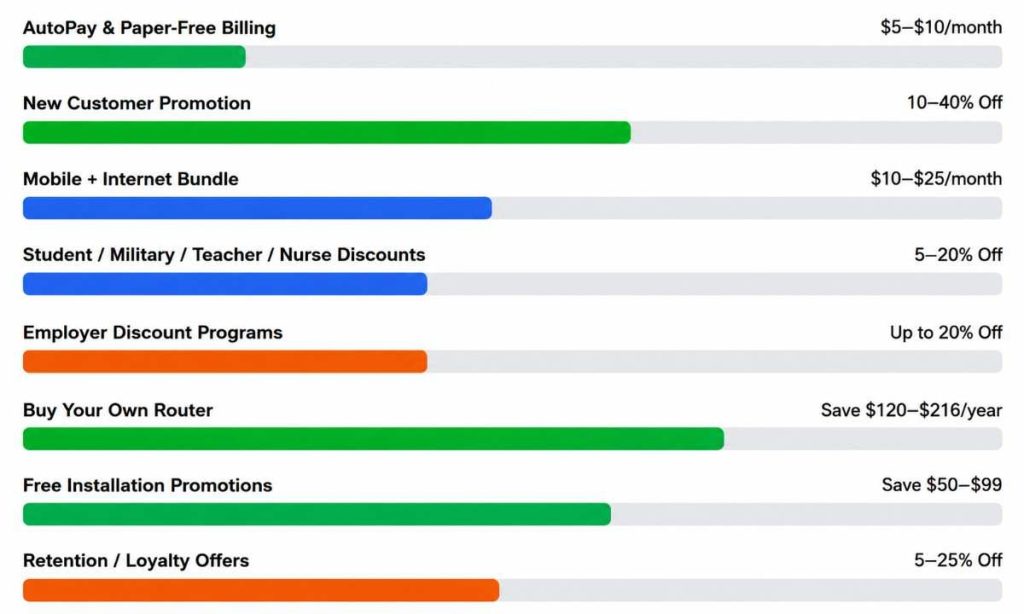
How Much Can You Save With Common Internet Discounts?
Internet providers offer a variety of discounts that can lower your monthly bill or reduce your first-year costs. The chart below compares the most common internet savings opportunities, including AutoPay discounts, bundle offers, new customer promotions, and equipment savings.
Frequently Asked Questions About Saving Money on Internet Service
1. What is the cheapest way to get home internet?
The cheapest way to lower your internet costs is to compare multiple providers, choose only the speed you need, use your own Wi-Fi router, and take advantage of new customer promotions or AutoPay discounts.
2. Is bundling internet and mobile worth it?
It can be. Bundling internet with a mobile plan often saves $10–$25 per month, but it’s only worthwhile if the combined price is lower than purchasing each service separately.
3. Can I negotiate my internet bill?
Yes. Many providers offer retention discounts when your promotional pricing is about to expire. Contact customer support 30–60 days before renewal and ask about available loyalty offers.
4. Is buying my own Wi-Fi router cheaper than renting one?
In most cases, yes. Renting a modem or router typically costs $10–$18 per month. Buying your own compatible router can eliminate this recurring fee and save money over time.
5. Which type of internet offers the best value?
Fiber internet usually provides the best value because it delivers faster download and upload speeds, reliable performance, and competitive pricing. If fiber isn’t available, cable internet is a strong alternative for most households.
6. Are there internet discounts for students, seniors, or military members?
Yes. Many providers offer special discounts for students, military personnel, veterans, teachers, nurses, healthcare workers, first responders, and eligible seniors. Availability varies by provider and location.
7. When is the best time to switch internet providers?
The best time to switch is when your promotional rate or contract is ending. Comparing offers before your price increases can help you qualify for new customer discounts and avoid paying higher standard rates.
8. Do all internet providers charge equipment rental fees?
No. Some providers include a Wi-Fi router at no extra cost, while others charge $10–$18 per month for modem or router rentals. Always review equipment fees before choosing a plan.
9. How much internet speed does the average household need?
For most households, 100–300 Mbps is sufficient for streaming, video calls, online learning, and everyday browsing. Larger families or heavy users may benefit from 500 Mbps or faster.
10. What hidden fees should I look for before signing up?
Besides the monthly plan price, check for installation fees, activation charges, modem or router rental fees, taxes, paper billing fees, and early termination fees. Comparing the total cost—not just the advertised price—helps you choose the best value.
Sources
- FCC Broadband Consumer Labels: https://www.fcc.gov/broadbandlabels
- BroadbandNow Research: https://broadbandnow.com/
- AT&T Internet: https://www.att.com/internet/
- Verizon Fios: https://www.verizon.com/home/internet/fios/
- HomeFi: https://homefi.info/
- Nomad Internet: https://nomadinternet.com/
- DSL Extreme: https://www.dslextreme.com/